

When you upgrade servers, you usually like to take things you paid for with you to your new one. This will show you how.
So you want to migrate CXS license from one server to another…
If you are just changing the main IP on the box, all you have to do is:
|
1 |
cxs -y |
If you’re actually moving cxs from one box to another, read on…
Let’s start with two servers..
old: 111.111.111.111
new: 222.222.222.222
You purchased Configserver’s CXS a while ago and have been using it on the old server (111.111.111.111). The new server is all set up now and you’ve just shut down the old one. To move your license from old to new, simply visit this page on configserver’s site:
http://license.configserver.com/cgi-bin/cxs/modify.cgi
To move the license you will need: (1) the old IP address that CXS is registered to currently, (2) the new server IP address and (3) the registered email address for the license.
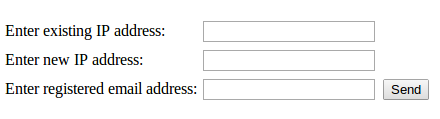
That form will send a verification email from sales@waytotheweb.com with a link that you need to click on to finish the process.
Then, You just install CXS on the new server:
SSH to your server, become root and:
|
1 2 3 4 |
wget http://www.configserver.com/free/cxsinstaller.tgz tar -xzf cxsinstaller.tgz perl cxsinstaller.pl rm -fv cxsinstaller.* |
Then, you can enable it, start it, maybe run a scan… and carry on!
Related posts from Linux Brigade!
 Move MySQL tmp directory You’ll eventually run into a client who has a crashed table in their database – this table will be pretty large – maybe even larger than the system’s default temporary directory (usually […]
 Manually run ClamAV on cPanel and check every user If you’re running WHM/cpanel and want to run a scan on every user manually, perhaps when first installing ClamAV, you’ll want to run this command which is endorsed by cPanel […]
- Import MySQL database from command line You’ll need to import a database via command line from time to time – I’ll normally opt for this anyway. After seeing how easy it is, you’ll probably end up using the command line instead […]
- mysqldump: Got error: 1142: SELECT,LOCK TABL command denied to user – for table ‘cond_instances’ Have you seen this error before? This is because you’re trying to dump the performance_schema database while locking tables.
The full error you received probably looks something […]
 Lock down your SSH port/access The instant a Linux server is connected to a public network it starts getting hit by attackers. There are people out there running programs constantly against IP ranges and they’ve hit […]