

When you upgrade servers, you usually like to take things you paid for with you to your new one. This will show you how.
So you want to migrate CXS license from one server to another…
If you are just changing the main IP on the box, all you have to do is:
|
1 |
cxs -y |
If you’re actually moving cxs from one box to another, read on…
Let’s start with two servers..
old: 111.111.111.111
new: 222.222.222.222
You purchased Configserver’s CXS a while ago and have been using it on the old server (111.111.111.111). The new server is all set up now and you’ve just shut down the old one. To move your license from old to new, simply visit this page on configserver’s site:
http://license.configserver.com/cgi-bin/cxs/modify.cgi
To move the license you will need: (1) the old IP address that CXS is registered to currently, (2) the new server IP address and (3) the registered email address for the license.
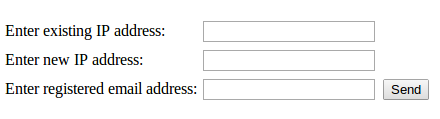
That form will send a verification email from sales@waytotheweb.com with a link that you need to click on to finish the process.
Then, You just install CXS on the new server:
SSH to your server, become root and:
|
1 2 3 4 |
wget http://www.configserver.com/free/cxsinstaller.tgz tar -xzf cxsinstaller.tgz perl cxsinstaller.pl rm -fv cxsinstaller.* |
Then, you can enable it, start it, maybe run a scan… and carry on!
Related posts from Linux Brigade!
 Lock down your SSH port/access The instant a Linux server is connected to a public network it starts getting hit by attackers. There are people out there running programs constantly against IP ranges and they’ve hit […]
- Delete files that are x days old Sometimes in Linux, you want to clear out older files in a directory. One instance would be if you have a security system and it continuously writes video files to a directory on your NAS […]
 Rescued my little Acer C7 Chromebook After installing chrubuntu on my c7, I decided to put it back to factory and give crouton a try so that I could run both chrome and crouton at the same time. I created the restore usb […]
- Search previous commands typed If you want to see a collection of your previous commands used in Linux, you can always type ‘history’ for a listing of them. You can even search through history by grepping for the […]
 Install CSF/LFD Firewall on your Linux Server The first thing on your mind when setting up a new Linux server (dedicated or VPS) is how you can increase security. One of the best tools in your bag of tricks should be the CSF […]